
Free restaurant checkup
How do guests find you online?
Look up your restaurant and see what guests see before they order: your Google listing, your reviews, your website and the searches people nearby make.
- Free, no card
- Your score right away
- The full report by email
- Steps to fix what is missing
What we look at
What a guest sees before they order.
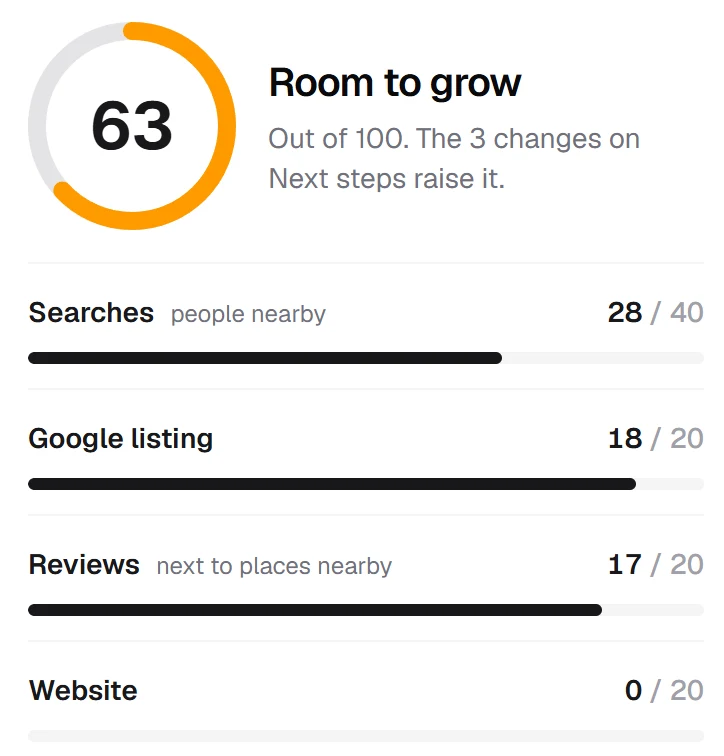
The checkup reads the same things a guest finds when they look for a place to eat.
Your Google listing
Your hours, phone and address, and where your website link sends guests: your own site, or a delivery app.
Your reviews
Your stars and how many reviews you have, next to the places like yours nearby.
Searches near you
Real searches made from your door, like "pizza near me", and who comes up before you.
Your website
Whether it opens securely, fits a phone, shows your menu and hours, and has an Order button that keeps guests on your site.
Questions
Questions about the checkup
Yes. There is no charge and no card. You see your score right away, and we ask for your name, email and mobile number to send you the full report.
We text you a code, so the report goes to a real person. Tips and offers only come if you tick the box for them, and you can see your report without it.
No. Any restaurant with a Google listing can be checked.
Yes. Choose "I help restaurants" on the form and check the restaurants you work with.
The report lists the steps, the ones worth the most first, with the buttons to press in your Google Business Profile. Some of them, like a website of your own, Panda Eats can do for you.